Sato Player on Canva: What it means for the Canva designer community
Earlier today, we launched Sato Player to the Canva community. It took us some time and many iterations to reach this point. But now that it’s done, the process was worth it. It makes sense for us to be visible to Canva’s audience and fill the gap.
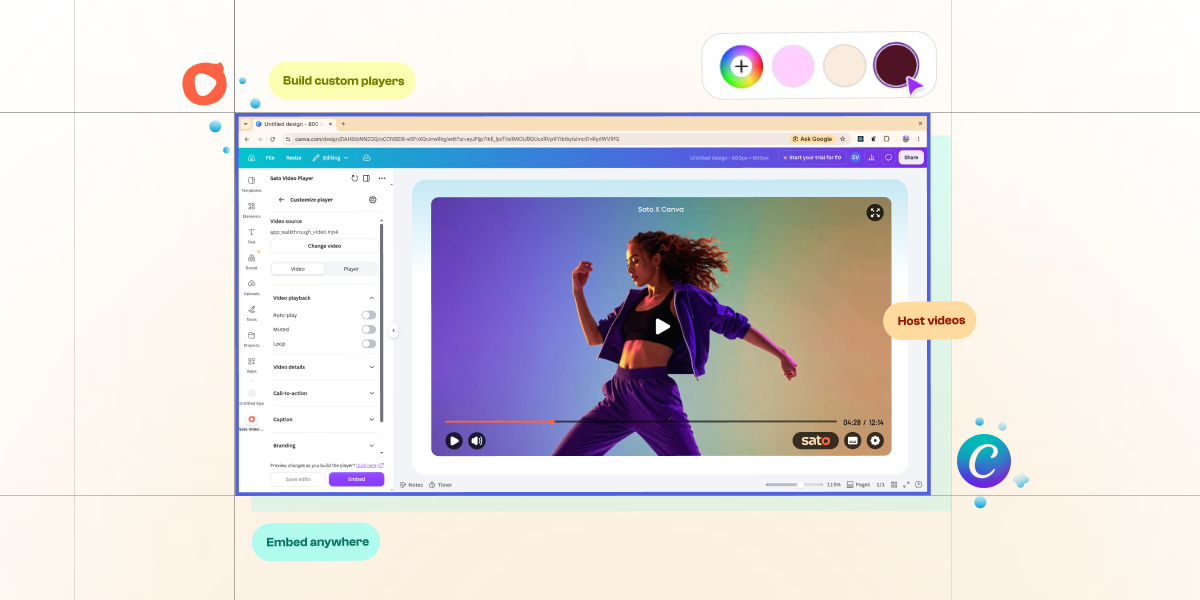
Designers and no-code developers usually depend on the free but uncustomizable Youtube player embed. At the other end of this spectrum are players like Vimeo which gives some level of customization but at a higher price point. With Sato Player, anyone building sites and making presentations can now add videos on them and play it on a custom video player without the development time and effort. Here’s an overview of what designers and no-code developers can achieve on Canva with Sato Player:
1. Host Videos
Sato Player comes with a content management system where videos can be stored. This video library lets you host your videos across the worldwide web. So, if you want to add a video on your Canva design, especially Canva sites and presentations, just upload the video on the Sato Video Player app on Canva and they are ready to be streamed.
2. Build custom players
The usual route for most building sites and adding videos on them is to upload videos on Youtube and then add the embed code on Canva. We believe this solves one problem but introduces a few more problems.
Firstly, your site/presentation has the Youtube player on it. This is off-brand because after designing a custom experience on Canva, the Youtube player’s brand imposes on your site. With Sato, you can design the player to match your brand. With customizations to the player UI and the ability to add your brand logo and colors, the Sato Player becomes your branded player. This amplifies your site because it is on-brand.
Secondly, Youtube videos are notorious for leading viewers to videos similar to yours. This recommendation and suggested video flow is great within Youtube but when that happens on your website, it is a clear distraction. Sato is a custom player, so this is not a feature and no bug. It is simply your video and nothing else. This means zero distractions on your site.
Thirdly, Youtube embeds have the known issue of slowing down webpage performance. Sato is a lightweight embed. It prioritizes your website content and intentionally loads only after your site is fully loaded. This ensures your user experience is uninterrupted and the website performs better.
3. Themes
Sato Player has prebuilt themes which is especially helpful for designers to experiment with player designs and build something unique out of those. These themes are fully customizable and give you a premade canvas instead of starting from scratch.
4. Text-to-speech
If your videos have speech, you can generate closed captions directly from the Sato Player app. This is instrumental as it makes your videos accessible for viewers with hearing difficulties or when the videos play on mute. So, instead of spending time in post-production, you can generate captions on Sato where the AI-text-to-speech engine does its job.
5. In-video call-to-actions
Call-to-action (CTA) within videos help you build an inbound channel for your marketing campaigns. You can add your custom CTAs on the videos and choose when and how it appears within your videos. You can add images and text and a custom URL button which can then be linked to where you want your audience to be at.
Sato Player is built to ensure designers and no-code developers can build custom players for their sites without the time or effort of building a player from scratch. And this move to be on Canva gets us one step closer to reaching the designer and developer community who needs a custom video playing experience. As we keep growing, the Sato video player app on Canva will grow to outdo itself and become the default choice for each of you.
We want you to have fun building the most unique video players on the planet. Here's the Sato Video Player Canva app.