How to Build Custom Play Button in HTML5 Video Player
.png)
So you want to build a custom play button for your website. Sure, it can be easily done using any HTML5 video player.
But the challenge for no-code developers isn’t in choosing which platform offers full customization freedom; rather, it is finding a reliable video player that lets them customize without writing a single line of code.
Which is why we built Sato to resolve this with full customization flexibility and easy embed.
Sato does more than just "play a video"
With Sato, a no-code video player builder, you can easily customize the play button, and every single element of the player, in minutes, saving you the hours it would otherwise take to build a customized HTML5 video player from scratch.
From the play button size, its standard and hover colors to its corner radius and inner padding, you’re just a click away from styling your play button the way you’ve always wanted.
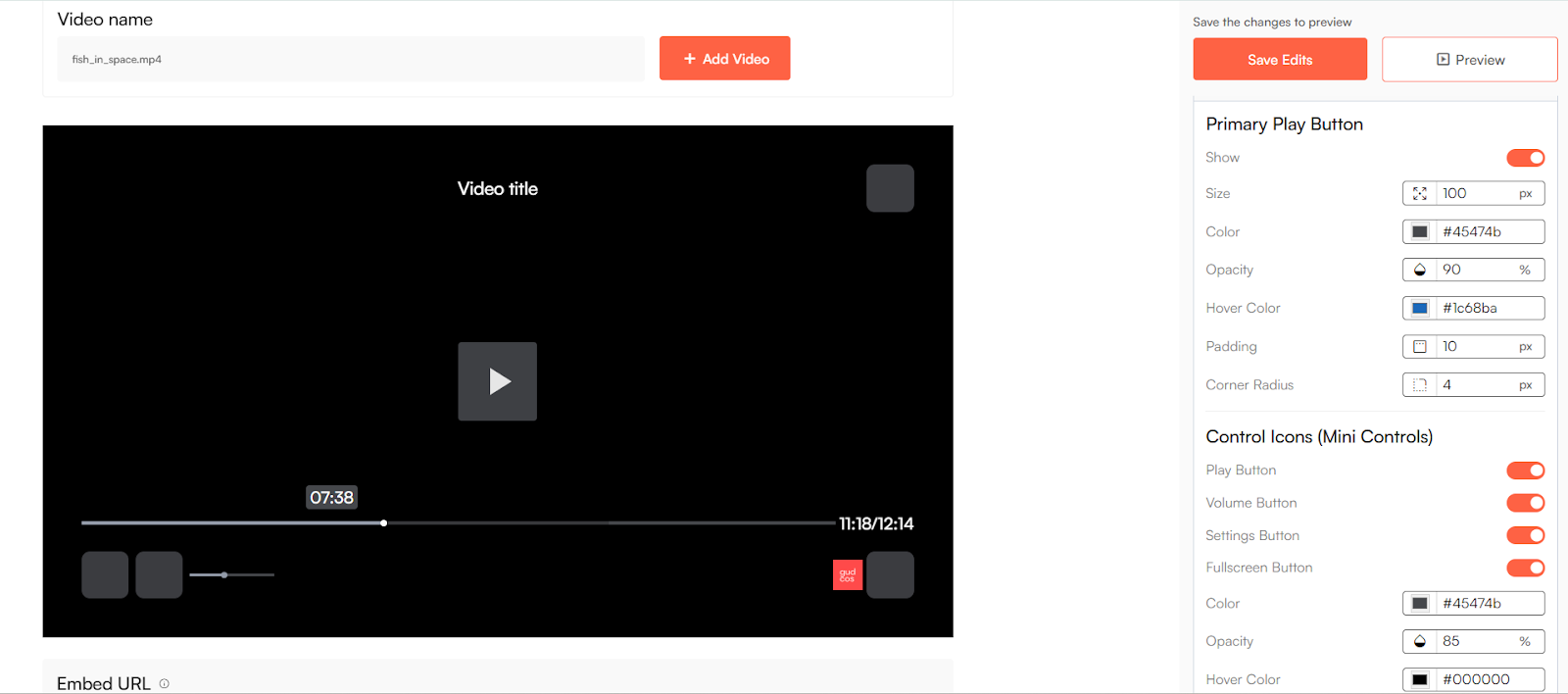
By simply creating a Sato account, you can directly access its dashboard, create your video player and start customizing your unique button that matches your site and brand’s vibes.
What else does Sato have to offer?
Sato’s purpose is pretty simple: to help make your video player look like your own.
Sato comes with a box full of customization possibilities. With over 50+ customizations to choose from, you can add your brand logo, change layout controls, playback settings, thumbnails, icons, and more. And all of these features are available in its forever free plan.
It’s high time to make your play button stand out.