How Customizing a Video Player Using Sato Helps in User Experience?
In this digital age, every second counts. People have shorter attention spans and they instantly form opinions about the videos they watch and the platforms they use. Whether you are a business owner, a developer or marketing teams, the way your audience experiences your videos can decide how long they stay, how much they engage and whether they come back again.
That's where the perks of a customizable video player come in. In this blog, you will get to know about the power of a customizable video player and how Sato makes it easier than ever to create a smooth, beautiful and engaging viewing experience.
Why is a Customizable Video Player Important?
At first, it is essential to understand why a customizable video player is essential. It helps to know how a player works. A video player is essentially the interface between your video file and your viewer. It decodes the videos and gives the user control over playback like play, pause, volume, full screen or subtitles.
Imagine two different video players – one looks bland, looks out of place and takes too long to buffer. The second one blends perfectly with the website, loads quickly and has smooth controls that feels natural to use. Which one would you prefer? The answer is obvious – the one that feels more polished and consistent.
A video player is like the digital stage for your content. When it is customised to suit your brand and audience, it builds trust, improves accessibility and makes your content look more professional. Businesses can’t afford to ignore this because a viewer's comfort will directly affect conversions, sales and brand perception. For developers, a customizable player is even more valuable because it gives them freedom to create something that reflects both performance and design without relying on complicated code.
When users enjoy a smooth video experience, they’re more likely to stay longer on a website, explore more content and ultimately engage with what you offer. Customization allows you to shape that journey exactly as you want — Whether it is adjusting colors to match brand identity or choosing which buttons to include to simplify the process of navigation.
This is where Sato comes in, offering a balance of simplicity, performance and creativity without requiring heavy coding or complex integrations.
How does Sato help users have a better experience?
Sato takes the idea of customization beyond colours and logos. It focuses on how real users interact with videos. The platform allows developers, team marketers and businesses to design a player that truly feels personal and seamless. Instead of forcing everyone to use the same interface, Sato helps you design your own experience.
When users create a video player on Sato, they immediately notice clearer controls, 50+ customization tools that help to venture and customise the player according to their preferences and to match their websites. Essentially, Sato lets you design not just the player but the entire viewing moment. Sato's focus on smooth streaming, control customization and distraction-free interfaces makes it a powerful tool for improving user satisfaction and engagement. Sato also allows control over how the video behaves (like autoplay, settings, looping) making it more functional for specific cases.
Now, let us look in detail at what makes Sato stand out and how its customizable feature leads to a better experience for users.
What Sato lets you Customize
Sato gives you the ability to personalize your video player completely. With Sato, users get to experiment with over 50+ customization to choose from within the player. These customizations make your video look like a part of your platform, not like something that is imported from elsewhere.
Video Playback
Autoplay, Muted and Loop settings help control how your video begins and repeats, ensuring smooth and continuous playback. They improve user engagement by instantly clicking on the autoplay button or on loop and design it accordingly.
Player Styling
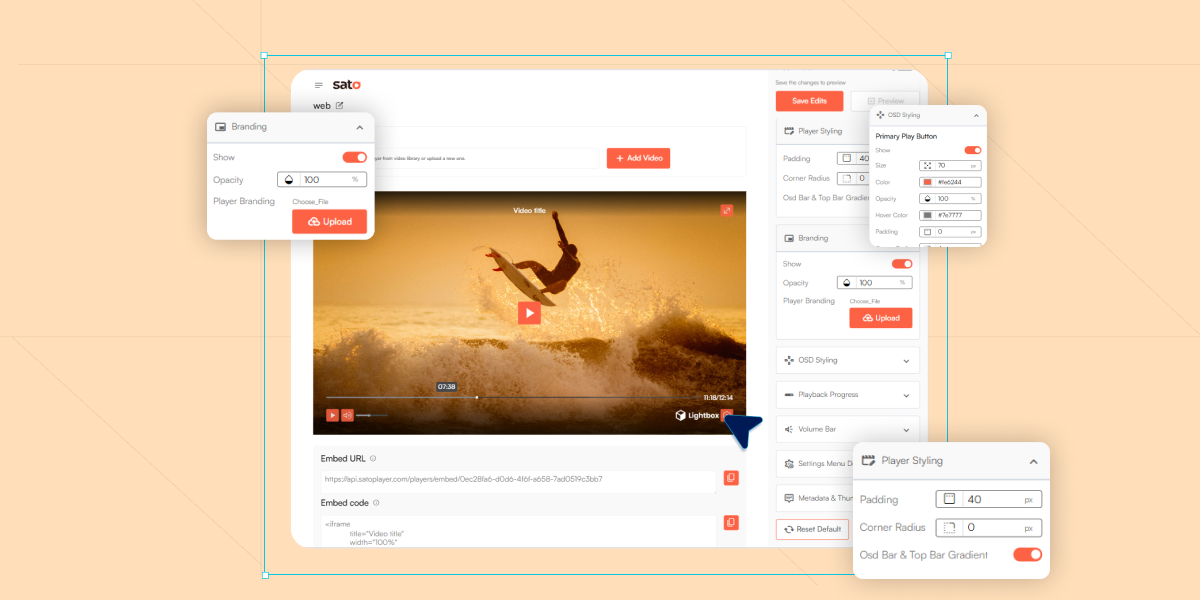
Users can adjust padding, corner roundness and gradient effects to enhance the visual appearance of their video player. These settings make the player look cleaner, more modern and more visually appealing.
Branding
The branding section allows you to show or hide your custom logo, giving full control over how your identity appears on the player. You can also adjust the logo's opacity to make it bold or subtle. You can upload your own player branding logo which will give a professional look and strengthen the brand recognition.
OSD Styling
OSD Styling lets you customize the main play button’s size, colour, opacity, hover effects, paddling and corner radius for a more interactive and branded look. Control icons also let you show or hide essential buttons like Play, Volume, Settings and Fullscreen to manage user control.
Playback Progress
The controls lets you customize how the playback progress bar looks and behaves in the video player. Users can set the bar's position, size, hover effect, opacity, colors and tooltips’ background (Styling), text colour and transparency.
Volume Bar
You can change the volume bar and lets you change its appearance. You can edit by adjusting its size, background colour, foreground colour and opacity in the settings.
Setting Menu Design
The customization option allows you to fully control the visual design of the player’s menu and color of the text. You can change the background colour, hover colour and text colour along with setting menu opacity.
Metadata and Thumbnails
You can set the video title and video description for the video player in this option, which is also crucial for SEO. It allows you to select the video title to appear on the player and also to change the In-Video Text Colour.
Reducing Frictions and Distractions
Sato aims to eliminate every small discomfort that could interrupt the viewing experience. Random pop ups, unwanted ads, mismatched designs or extra buttons can distract users from what really matters — the video itself. Sato allows developers/businesses to hide unnecessary elements, control playback behaviours.
By reducing such frictions, you keep viewers’ focused exactly where they should be. This clean, uninterrupted flow builds stronger engagement and promotes a sense of trust and quality.
Conclusion
A customizable video player might seem like a minor detail, but it plays a major role in shaping how audiences connect with your brand and content. In a world full of generic designs and short attention spans, giving viewers a clean consistent and enjoyable experience, can set you apart.
To have this experience, Sato can help turn this vision into reality. By allowing businesses and developers to customize every detail from design to control behaviour. It transforms video playback into a brand experience, removing frictions, boost engagements and ensures that every second of viewing feels effortless.
When videos look better and feel smoother, users stay longer and interact more. That's the real magic of Sato — it combines thoughtful design and simplicity to create better viewing experiences, not just videos.